Authentication protocols for applications: REST APIs, MCP servers and beyond
Introduction
There is no single ideal authentication protocol, only the right protocol for each situation: who is calling (a human, a service, an AI agent), on whose behalf, and at what level of risk. An API key is enough for an internal script; a consumer application requires OAuth 2.0 and OpenID Connect; a remote MCP server now follows a precise OAuth 2.1 profile.
Two notions are often confused:
- Authentication (AuthN): proving who you are (a user, an application, a machine).
- Authorization (AuthZ): determining what you are allowed to do (read, write, administer).
OAuth 2.0 is a delegated authorization protocol; OpenID Connect adds the authentication layer on top. That distinction explains why the two are almost always used together.
This article reviews the methods, from the simplest to the most robust, then looks in detail at MCP (Model Context Protocol) servers, which connect AI agents to tools and data.
Simple methods: Basic Auth and API keys
Both methods rely on a static secret sent with every request. They are easy to implement and suit internal or server-to-server exchanges, but never an application acting on behalf of third-party users.
HTTP Basic Authentication
The client sends the username and password, Base64-encoded, in the Authorization header:
GET /api/orders HTTP/1.1
Authorization: Basic YWxpY2U6czNjcjN0
- Pros: standard (RFC 7617), supported everywhere, no infrastructure.
- Limits: Base64 is not encryption, so HTTPS is mandatory; the password travels with every call; no expiry, no scope, revocation = changing the password.
- Reasonable use: internal tools, admin endpoints behind a VPN, the initial exchange to obtain a token.
API keys
A long random string identifies the calling application, sent in a dedicated header:
GET /v1/weather?city=Lyon HTTP/1.1
X-API-Key: sk_live_4f9a…
- Pros: easy to issue, revoke and rotate; ideal for per-customer billing and quotas.
- Limits: the key identifies an application, not a user; it is a “bearer” secret (whoever holds it can use it); often no expiry and no fine-grained scope.
- Best practices: send it in a header, never in the URL (it would end up in logs); store only a hash on the server side; prefix keys (
sk_live_,sk_test_) to make leaks easier to detect; allow several active keys so they can be rotated without downtime.
Tokens: sessions, Bearer and JWT
Instead of sending a permanent secret, the client exchanges proof of identity for a short-lived token. This is the basis of every modern method.
Sessions and cookies
After login, the server creates a session and returns its identifier in a cookie. This is the historical model for server-rendered web applications.
- Strengths: immediate revocation (delete the session);
HttpOnly,SecureandSameSitecookies protect against theft by JavaScript. - Limits: server-side state (shared storage needed across instances), CSRF protection required, poorly suited to mobile clients or APIs consumed by third parties.
Bearer tokens
A bearer token (RFC 6750) is sent in the Authorization: Bearer <token> header. Whoever holds it can use it, so it must be short-lived, sent over HTTPS and never logged. The token can be opaque (a string the server checks with the issuer through introspection, RFC 7662) or self-contained (a JWT).
JSON Web Token (JWT)
A JWT (RFC 7519) is made of three Base64URL-encoded parts: header.payload.signature. The payload contains claims:
{
  "iss": "https://auth.example.com",
  "sub": "user_8241",
  "aud": "https://api.example.com",
  "exp": 1793011200,
  "scope": "orders:read"
}
The API verifies the signature with the issuer’s public key (published as a JWKS), then checks iss, aud and exp, with no network call.
- Strengths: fast local verification, ideal for microservices.
- Pitfalls: a JWT cannot be revoked before it expires (hence short lifetimes, 5 to 15 minutes, plus refresh tokens); reject the
nonealgorithm and pin the list of accepted algorithms (RS256, ES256…); the payload is readable by anyone, it is not encrypted; never forget to check theaudaudience.
A JWT is a token format, not a protocol: how you obtain that token is what OAuth 2.0 defines.
OAuth 2.0 and OAuth 2.1: delegated authorization
OAuth 2.0 (RFC 6749) lets an application access an API on behalf of a user, without ever knowing their password. It is the de facto standard for public APIs (Google, GitHub, Microsoft, Salesforce…). OAuth 2.1, being finalised at the IETF, consolidates a decade of best practice: PKCE becomes mandatory, and the implicit and “password” flows are removed.
The four roles
| Role | Description | Example |
|---|---|---|
| Resource owner | The user who gives consent | Alice |
| Client | The application requesting access | A mobile app, an MCP client |
| Authorization server | Authenticates and issues tokens | Keycloak, Auth0, Entra ID, Okta |
| Resource server | The protected API that validates tokens | The REST API, the MCP server |
The recommended flow: Authorization Code + PKCE
- The client generates a random secret (
code_verifier) and its SHA-256 hash (code_challenge). - It redirects the user to the authorization server with
client_id,redirect_uri,scope,stateandcode_challenge. - The user authenticates and gives consent.
- The authorization server redirects back to the client with a single-use authorization code.
- The client exchanges this code, together with the
code_verifier, for an access token (and often a refresh token). - The client calls the API with
Authorization: Bearer <access_token>.
PKCE (RFC 7636) prevents an attacker who intercepts the code from exchanging it, since they don’t know the code_verifier. It is now required for every client, including server-side applications.
Other flows (grant types)
| Flow | Use case | User present? |
|---|---|---|
| Authorization Code + PKCE | Web apps, mobile apps, SPAs, MCP clients | Yes |
| Client Credentials | Service to service, scheduled jobs, back ends | No |
| Device Authorization (RFC 8628) | TVs, CLIs, connected devices without a browser | Yes, on another device |
| Refresh Token | Renew an expired access token without logging in again | No |
| Token Exchange (RFC 8693) | A service swaps a token it received for a token for a downstream API | No |
| Removed in OAuth 2.1 | — |
Scopes, audiences and refresh tokens
- Scopes (
orders:read,profile) limit what the token allows; request the bare minimum. - The resource parameter (RFC 8707) binds the token to a specific API: a token issued for API A must be rejected by API B.
- Refresh tokens must be rotated for public clients (each use issues a new one and invalidates the old one).
OpenID Connect and SAML: federated identity and SSO
When the application needs to know who the user is (single sign-on, “Sign in with Google”), you add an identity layer on top of OAuth: OpenID Connect for modern applications, SAML for existing enterprise systems.
OpenID Connect (OIDC)
OIDC reuses OAuth 2.0’s Authorization Code flow and adds the openid scope. The authorization server (called the OpenID Provider) returns, in addition to the access token, an ID token: a signed JWT describing the user (sub, email, name, auth_time…).
- Automatic discovery:
/.well-known/openid-configurationpublishes the endpoints, the algorithms and the public key (JWKS). - UserInfo endpoint to obtain additional attributes.
- Golden rule: the ID token is for the client to learn who the user is; the access token is for calling the API. Never send an ID token to an API as an access token.
SAML 2.0
SAML (Security Assertion Markup Language) exchanges signed XML assertions between an identity provider (IdP: ADFS, Okta, Entra ID) and a service provider (SP), through browser redirects.
- Strengths: very widespread in large enterprises and B2B SaaS, mature.
- Limits: verbose, hard to implement correctly (XML signature wrapping attacks), designed for the browser rather than for APIs or mobile apps.
- Trend: new projects favour OIDC; SAML is still needed to integrate with existing corporate directories, often through an identity broker (Keycloak, Auth0) that translates SAML into OIDC.
What about the users themselves?
OIDC and SAML delegate identity verification to the identity provider, which can then use multi-factor authentication (MFA) or passkeys (WebAuthn/FIDO2), today the most phishing-resistant method.
mTLS, HMAC signatures and DPoP: strong authentication between machines
These mechanisms address the main weakness of bearer tokens (a stolen token can be used by anyone) by requiring proof of possession of a key that only the legitimate client holds.
Mutual TLS (mTLS)
In a classic TLS handshake, only the server presents a certificate. With mTLS, the client presents one too, signed by a certificate authority the server trusts.
- Uses: microservice communication (often automated by a service mesh such as Istio or Linkerd), banking APIs and Open Banking, zero-trust architectures.
- With OAuth: RFC 8705 binds an access token to the client’s certificate (a certificate-bound token); a stolen token is useless without the private key.
- Constraints: certificate lifecycle management (issuance, rotation, revocation); harder to deploy in browsers or on mobile.
Request signing (HMAC)
The client and the server share a secret key. The client computes a signature (HMAC-SHA256) over parts of the request (method, path, timestamp, body hash) and sends it in a header. The server recomputes it and compares.
- Examples: AWS Signature Version 4, webhook verification (Stripe, GitHub, Slack).
- Strengths: the secret never travels; message integrity is guaranteed; the timestamp blocks replay.
- Standardisation: RFC 9421 (HTTP Message Signatures) now standardises this approach, including with asymmetric keys.
DPoP (Demonstrating Proof of Possession)
DPoP (RFC 9449) brings proof of possession to the application layer, without a certificate infrastructure. The client generates a key pair and attaches a small signed JWT (the DPoP header) to every request, covering the method, the URL and a timestamp. The authorization server binds the access token to that public key.
DPoP is a good fit for SPAs and mobile apps, where mTLS is hard to deploy.
The case of MCP servers
A remote MCP server is an OAuth 2.1 resource server: under the 2026-07-28 revision of the specification, the client discovers the authorization server on its own, identifies itself with a URL (Client ID Metadata Document) and obtains a token valid for that server only. A local (stdio) MCP server, on the other hand, simply reads its credentials from the environment.
Reminder: what is MCP?
The Model Context Protocol is an open protocol that connects AI applications (Claude, ChatGPT, VS Code, Cursor…) to tools and data sources through “MCP servers”. What makes it special from a security standpoint: an agent can connect to a server it has never seen before, with no prior relationship between the client’s vendor and the server’s. The authentication profile is designed for exactly that scenario.
Two transports, two approaches
The specification makes authorization optional, but sets out what to do depending on the transport.
| Transport | Where the server runs | Authentication |
|---|---|---|
| stdio | Local process launched by the host application | Do not follow the OAuth specification; read credentials from the environment (variables, config files) |
| Streamable HTTP | Remote server reachable by URL | The MCP specification’s OAuth 2.1 profile |
The old HTTP+SSE transport (2024-11-05 revision) is deprecated.
The authorization flow, step by step
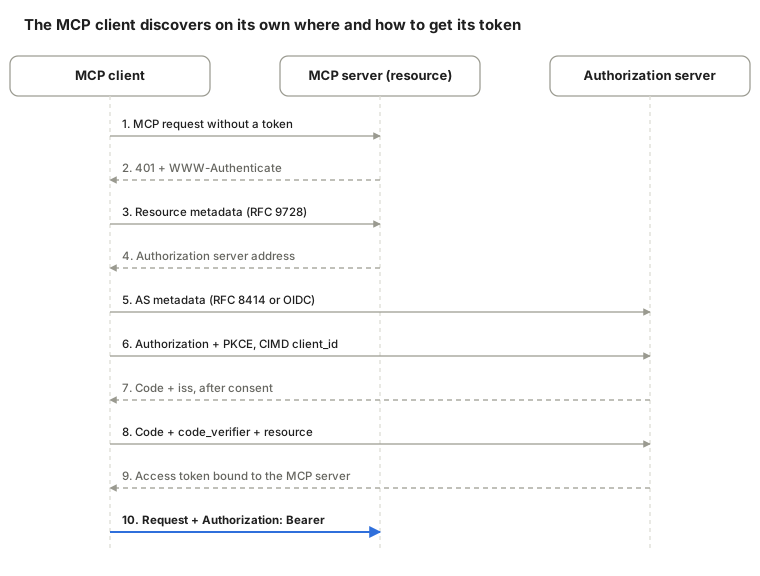
The client only needs the MCP server’s URL: an initial 401 rejection tells it where to find the metadata; it then runs a standard Authorization Code + PKCE flow and replays its request with the token.
The server’s 401 response looks like this:
HTTP/1.1 401 Unauthorized
WWW-Authenticate: Bearer resource_metadata="https://mcp.example.com/.well-known/oauth-protected-resource"
The standard building blocks involved
| Building block | Reference | Role in MCP | Requirement |
|---|---|---|---|
| Protected Resource Metadata | RFC 9728 | The MCP server states which authorization server to use | Mandatory (server and client) |
| Authorization server metadata | RFC 8414 and OpenID Connect Discovery | Endpoint discovery | The client must support both |
| PKCE | RFC 7636 | Protects the code exchange | Mandatory |
| Resource Indicators | RFC 8707 | Binds the token to the target MCP server | Mandatory |
| Client ID Metadata Documents (CIMD) | IETF draft | The client_id is an HTTPS URL pointing to a JSON document describing the client |
Recommended |
| Dynamic Client Registration | RFC 7591 | Automatic client registration | Optional, deprecated in 2026-07-28 |
| Issuer validation | RFC 9207 | The client checks iss before exchanging the code |
Mandatory since 2026-07-28 |
Client registration: the order of precedence
How does an MCP client obtain a client_id from an authorization server it doesn’t know? The specification recommends this order:
- Use pre-registered credentials for that server, if it has any.
- Use a Client ID Metadata Document if the authorization server advertises
client_id_metadata_document_supported. - Fall back to Dynamic Client Registration if the server exposes a
registration_endpoint. - Otherwise, ask the user to enter the client details themselves.
CIMD has the advantage of being portable: the identifier is a URL hosted by the client’s vendor, resolved on demand by any authorization server, with no registration database to maintain.
{
  "client_id": "https://app.example.com/oauth/client-metadata.json",
  "client_name": "My MCP client",
  "redirect_uris": ["http://127.0.0.1:3000/callback"],
  "grant_types": ["authorization_code"],
  "token_endpoint_auth_method": "none"
}
MCP-specific security points
- No token passthrough: the MCP server must never forward the token it received from the client to a downstream API; it obtains its own token (for example via Token Exchange).
- Audience validation: the MCP server only accepts tokens issued specifically for it.
- Issuer-bound credentials: a client must associate its credentials with the authorization server that issued them and never reuse them with another one.
- Incremental consent: since the 2025-11-25 revision, a client can request additional scopes at the moment a tool needs them, rather than asking for everything up front.
- stdio servers: secrets in the environment should have minimal scope, because the local process runs with the user’s permissions.
Comparison and decision guide
The right choice depends first on whether a human user is involved, then on the level of risk.
| Method | Identifies | Expiry / revocation | Complexity | Typical use case |
|---|---|---|---|---|
| Basic Auth | A user or a technical account | None / password change | Very low | Internal tools, administration |
| API key | An application | Manual / simple revocation | Low | Public APIs with quotas, server integrations |
| Session + cookie | A user | Configurable / immediate | Low | Classic web applications |
| JWT | User or application | Short / hard before expiry | Medium | Microservices, stateless APIs |
| OAuth 2.0 / 2.1 | An application acting for a user | Short + refresh / via the authorization server | Medium to high | APIs open to third parties, remote MCP clients |
| OpenID Connect | A user (identity) | Short | Medium | SSO, “Sign in with…” |
| SAML 2.0 | A user (identity) | Short | High | Legacy enterprise SSO |
| mTLS | A machine | Certificate lifetime / CRL, OCSP | High | Zero trust, service mesh, finance |
| HMAC signature | An application + message integrity | Per request (timestamp) | Medium | Webhooks, cloud APIs |
| DPoP | Application, token bound to a key | Short | Medium | High-security SPAs and mobile apps |
Decision shortcut:
- A user signs in to your application → OIDC (with passkeys or MFA at the identity provider).
- A third-party application accesses a user’s data → OAuth 2.1 Authorization Code + PKCE.
- A service calls another service → Client Credentials, hardened with mTLS or DPoP if the data is sensitive.
- You receive webhooks → HMAC signature.
- An internal script or a prototype → API key, with rotation.
- A remote MCP server → the MCP specification’s OAuth 2.1 profile (previous section); a local MCP server → environment variables.
Best practices and conclusion
Whatever protocol you pick, most incidents come from implementation details rather than from the protocol itself.
- HTTPS everywhere, no exceptions, including internally.
- Don’t reinvent: rely on a proven authorization server (Keycloak, Auth0, Entra ID, Okta, Cognito…) and maintained libraries.
- Short-lived tokens (minutes) and rotated refresh tokens.
- Validate every token: signature, issuer
iss, audienceaud, expiryexp, scopes. - Least privilege: minimal scopes, one token per target API.
- Secrets out of the code: a vault (Vault, AWS Secrets Manager…) or environment variables, never in Git.
- Nothing sensitive in URLs or logs (keys, tokens, authorization codes).
- Rate limiting on authentication endpoints to slow down credential stuffing.
- Log and monitor token issuance, failures and revocations.
- For AI agents: explicit user consent, tokens limited to the target MCP server, no token passthrough to downstream APIs.
In short, API keys and Basic Auth remain useful for simple cases; OAuth 2.1 and OpenID Connect are the norm as soon as users and third parties are involved; mTLS, HMAC and DPoP harden machine-to-machine exchanges. MCP servers reinvent nothing: they apply these standards through a strict profile, designed so that AI agents can connect to thousands of services without prior registration.
Sources
- MCP — Authorization, 2026-07-28 revision
- MCP — Client Registration
- MCP Authorization Spec 2026-07-28: what changed (SSOJet)
- MCP Authentication: requirements of the 2026-07-28 revision (SSOJet)
- What’s new in the MCP 2025-11-25 authorization spec (den.dev)
- RFCs cited: 6749 (OAuth 2.0), 6750 (Bearer), 7519 (JWT), 7617 (Basic), 7636 (PKCE), 7662 (introspection), 8414, 8628, 8693, 8705, 8707, 9207, 9421, 9449, 9728 — available at rfc-editor.org