From business need to frontend: AI-generated mockups and code with Specification-Driven Design
From business need to frontend: AI-generated mockups and code with Specification-Driven Design
“We need a screen where employees can request time off and managers can approve it.”
A few years ago, that sentence kicked off weeks of workshops, wireframes, back-and-forth with designers, and then development. Today, an AI agent can produce credible mockups and the matching React code in a few minutes. The problem is no longer producing: it is producing the right thing, in a way that is consistent, reproducible and under control.
That is exactly what Specification-Driven Design (or Spec-Driven Development, SDD) offers: making the specification, rather than the prompt or the code, the source of truth for the whole chain. This article shows how to apply it end to end, from business need to frontend, with particular attention to the real benefits and to the issues you should not ignore.
Contents
- The problem with “vibe coding”
- The principle of Specification-Driven Design
- Pipeline overview
- Step-by-step walkthrough
- Repository layout
- Available tooling
- The benefits
- Being aware of what is at stake
- Where humans fit: the control grid
- Where to start
- Conclusion
1. The problem with “vibe coding”
The most intuitive way to use AI to build an interface is to describe what you want in a chat, look at the result, then fix it in small touches: “put the button on the right”, “no, lighter”, “add a filter”. This is informally called vibe coding.
It works very well for a throwaway prototype. It works much less well as soon as you are building a real product:
- Intent gets lost. Decisions are scattered across a chat history nobody will read again. Why is this field mandatory? Nobody remembers.
- Results are not reproducible. The same prompt, run again tomorrow or with another model, produces a different interface.
- Consistency erodes. Each screen is generated in isolation; colours, spacing and behaviours drift apart.
- Review is hard. You cannot validate a business need by reading 2,000 lines of JSX.
- Edge cases are forgotten. AI happily draws the happy path; empty, error and loading states, access rights and accessibility fall through the cracks.
Specification-Driven Design answers these five problems with a simple idea: you stop writing prompts and start writing specifications.
2. The principle of Specification-Driven Design
SDD rests on three convictions.
1. The specification is the source of truth. Mockups and code are derived artifacts that can be regenerated from the spec. If the result is not right, you don’t patch the code by hand: you fix the spec and regenerate.
2. The specification is structured and progressive. You don’t go from one business sentence to code in a single step. You refine through successive layers, each readable and approvable by the right person:
| Layer | Question it answers | Reviewed by |
|---|---|---|
| Business need | Why? For whom? | Business, product owner |
| Functional spec | What? Under which rules? | Product owner, business |
| Experience spec | How does the user go about it? | UX designer |
| Design system | What does it look like? | UI designer |
| Technical plan | With which architecture? | Tech lead |
3. The specification lives in the Git repository. These are Markdown, JSON or YAML files, versioned alongside the code, subject to the same pull requests and the same review. Git history becomes the history of decisions.
The approach took shape in 2025 with the arrival of dedicated tools (GitHub Spec Kit, AWS’s Kiro, OpenSpec, BMAD-METHOD, Tessl…), which all offer, with variations, the same sequence: specify → clarify → plan → break into tasks → implement.
3. Pipeline overview
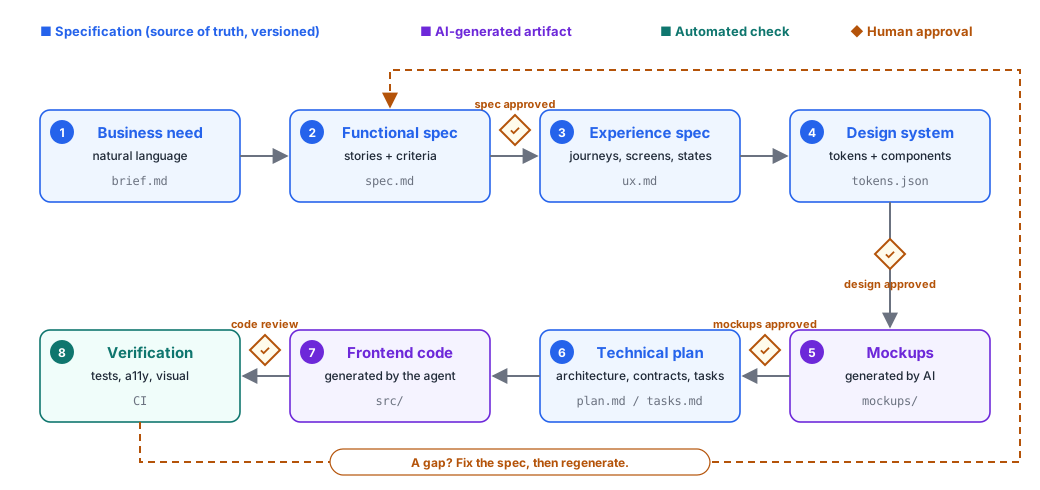
Three families of elements stand out:
- In blue, the specifications: written or co-written with AI, approved by a human, versioned. They are authoritative.
- In purple, the generated artifacts: mockups and code, produced by AI from the specs. They are disposable and can be regenerated.
- In green, the automated checks: tests, accessibility audit, visual comparison.
The orange diamonds mark the human approval points. The dotted arrow is the golden rule: when verification reveals a gap, go back to the spec.
4. Step-by-step walkthrough
Running example: an internal time-off request application.
Step 0 — Write the project “constitution”
Before any feature, you write down once and for all the non-negotiable rules the AI must follow on every generation. Spec Kit calls this file the constitution; other tools talk about steering or project rules.
<!-- specs/constitution.md -->

# Project constitution

## Stack

- React 19 + strict TypeScript, Vite, React Router.
- UI components: only those in `src/design-system/`. No hard-coded styles.
- API calls: only through the client generated from `contracts/openapi.yaml`.

## Quality

- Accessibility: WCAG 2.2 level AA is mandatory.
- Every screen explicitly handles the states: loading, empty, error, success.
- Every acceptance criterion in the spec has at least one end-to-end test.

## Forbidden

- No new npm dependency unless it is listed in the plan and approved by a human.
- No real personal data in fixtures or mockups.
- No secrets or API keys in the code.
This file is the single most cost-effective tool in the whole approach: it saves you from repeating the same instructions in every prompt, and it makes deviations detectable.
Step 1 — Express the business need
The starting point is still natural-language text, written by the business. It doesn’t need to be perfect; above all, it must say why.
<!-- specs/001-time-off/brief.md -->

# Need: managing time-off requests

Today, time-off requests go through email and a shared spreadsheet.
Managers lose requests, employees don't know their balance,
and HR re-keys everything at the end of the month.

We want:

- an employee to be able to submit a request and see their balance in real time;
- their manager to be notified and able to approve or reject in one click;
- HR to be able to export the month's approved leave.

Constraints: usable on mobile, compliant with our accessibility rules.
Success metric: less than 2 minutes to submit a request.
Step 2 — Generate, then clarify the functional spec
You ask the agent to turn the need into a structured specification: roles, user stories, business rules, testable acceptance criteria. A constrained notation helps a lot; Kiro, for example, uses EARS (Easy Approach to Requirements Syntax), which enforces forms such as “WHEN… THE SYSTEM SHALL…”.
<!-- specs/001-time-off/spec.md (excerpt) -->

## Roles

- Employee, Manager, HR.

## US-01 — Submit a request

As an employee, I want to submit a time-off request
so that I can plan my absence without going through email.

### Acceptance criteria

- AC-01.1 WHEN the employee opens the form,
  THE SYSTEM SHALL display their available balance per leave type.
- AC-01.2 IF the end date is before the start date,
  THEN THE SYSTEM SHALL block submission and display an error on the relevant field.
- AC-01.3 IF the number of days requested exceeds the balance,
  THEN THE SYSTEM SHALL warn without blocking submission.
- AC-01.4 WHEN the request is submitted,
  THE SYSTEM SHALL display a confirmation and notify the manager.

## Open questions

- [ ] Are half days allowed?
- [ ] Can a manager approve their own request?
The “Open questions” section is essential. Rather than letting the AI decide silently, you explicitly ask it to list its ambiguities: this is Spec Kit’s clarify step. The business answers them, the spec is updated, then approved (first human gate).
Step 3 — Specify the experience
This layer describes journeys and screens without talking about appearance yet: which screens, which information, which actions, which states.
<!-- specs/001-time-off/ux.md (excerpt) -->

## Journey J1 — Submit a request (employee, mobile first)

Home → "New request" → Form → Summary → Confirmation

## Screen S2 — Request form

Content:

- "My balance" card (per leave type) → AC-01.1
- Leave type (list), start date, end date, half day (if approved)
- Optional comment (500 characters max)
  Actions: "Review my request" (primary), "Cancel" (secondary)

States:

- Loading: skeleton for the balance card, form disabled
- Balance failed to load: message + "Try again" button
- Validation error: message under the field, focus moved to it → AC-01.2
- Balance exceeded: non-blocking warning banner → AC-01.3
Notice the traceability: every screen element points back to the acceptance criterion that justifies it. That is what will later make it possible to check automatically that nothing has been forgotten.
Step 4 — Formalise the design system
To stop the AI from reinventing a style on every screen, the visual identity must also be a specification. The standard format is the W3C design tokens format: in October 2025 the Design Tokens Community Group published the first stable version of its specification (2025.10), already supported by Figma, Penpot, Sketch, Style Dictionary, Tokens Studio and Terrazzo.
{
  "color": {
    "brand": {
      "primary": {
        "$type": "color",
        "$value": {
          "colorSpace": "srgb",
          "components": [0.145, 0.388, 0.922],
          "hex": "#2563eb"
        }
      }
    },
    "feedback": {
      "warning": {
        "$type": "color",
        "$value": {
          "colorSpace": "srgb",
          "components": [0.706, 0.325, 0.035],
          "hex": "#b45309"
        }
      }
    }
  },
  "space": {
    "md": { "$type": "dimension", "$value": { "value": 16, "unit": "px" } }
  }
}
You add the catalogue of allowed components (button, field, card, banner…) with their variants and usage rules. A major advantage: a single token file can generate web CSS variables and iOS and Android resources, and feed the mockup tool.
If the company already has a design system, reuse it as is: that is actually where the approach is most effective.
Step 5 — Generate the mockups
You now have everything you need to generate constrained mockups: the agent receives the experience spec (which screens, which states) and the design system (which components, which tokens). It produces:
- one screen per entry in
ux.md, with each of its states (loading, empty, error, success); - in mobile and desktop versions;
- using only components from the catalogue.
Depending on the tools, mockups are produced directly in a design tool (Figma Make, for example, builds on the team’s existing component libraries), in an interface generation tool (Google Stitch, Uizard, Visily, UX Pilot), or as an HTML prototype. Thanks to MCP, a coding agent can also read from and write to the design tool.
This is the second human gate, and probably the most important one: the designer and the business approve the mockups. A comment (“the balance should be visible before even opening the form”) is not fixed in the mockup: it becomes a change to ux.md, and then you regenerate.
Step 6 — Plan the implementation
The agent then produces a technical plan that respects the constitution, followed by a list of small, ordered tasks.
<!-- specs/001-time-off/tasks.md (excerpt) -->

- [ ] T01 Generate the API client from contracts/openapi.yaml (endpoints /leaves, /balances)
- [ ] T02 Create the /time-off/new route and the page skeleton (S2)
- [ ] T03 LeaveBalanceCard component: loading / error / success states (AC-01.1)
- [ ] T04 Form: date validation, error message, focus management (AC-01.2)
- [ ] T05 Balance-exceeded warning banner (AC-01.3)
- [ ] T06 Playwright tests AC-01.1 → AC-01.4 + axe-core audit on S2
The API contract (OpenAPI) deserves a mention: it is a specification in its own right, shared with the backend team. The frontend can be built and tested against a mock server generated from this contract, before the API even exists.
Step 7 — Generate the code
The coding agent (Claude Code, Copilot, Cursor, Codex, Gemini CLI, Kiro…) works through the tasks one by one. Each task is small, referenced and verifiable, which greatly limits drift.
You keep a human code review on pull requests: it no longer focuses on formatting, but on what AI misses most often (security, error handling, added dependencies, performance).
Step 8 — Verify automatically
Verification closes the loop. Because each acceptance criterion is phrased in a testable way, it translates directly into a test:
// e2e/time-off/us-01.spec.ts
import { test, expect } from "@playwright/test";
import AxeBuilder from "@axe-core/playwright";

test("AC-01.2 — an end date before the start date blocks submission", async ({
  page,
}) => {
  await page.goto("/time-off/new");
  await page.getByLabel("Start date").fill("2026-11-10");
  await page.getByLabel("End date").fill("2026-11-05");
  await page.getByRole("button", { name: "Review my request" }).click();

  const end = page.getByLabel("End date");
  await expect(end).toHaveAttribute("aria-invalid", "true");
  await expect(end).toBeFocused();
});

test("S2 — no WCAG A/AA accessibility violations", async ({ page }) => {
  await page.goto("/time-off/new");
  const results = await new AxeBuilder({ page })
    .withTags(["wcag2a", "wcag2aa", "wcag21aa", "wcag22aa"])
    .analyze();
  expect(results.violations).toEqual([]);
});
Add to this:
- a visual comparison between screenshots of the frontend and the approved mockups;
- a traceability check: a script verifies that every
AC-xxin the spec is covered by at least one test; - a design system compliance check: no hard-coded colours or sizes.
When a check fails, the rule stays the same: work out whether the error comes from the spec or from the generation, and fix it at the source.
5. Repository layout
my-app/
├── specs/
│   ├── constitution.md            # non-negotiable rules
│   ├── design-system/
│   │   ├── tokens.json            # design tokens (DTCG format)
│   │   └── components.md          # catalogue and usage rules
│   └── 001-time-off/
│       ├── brief.md               # business need
│       ├── spec.md                # stories + criteria (approved)
│       ├── ux.md                  # journeys, screens, states
│       ├── plan.md                # architecture
│       └── tasks.md               # ordered tasks
├── contracts/
│   └── openapi.yaml               # API contract
├── mockups/                       # generated artifacts (or a link to the design tool)
├── src/                           # generated and reviewed code
└── e2e/                           # tests derived from acceptance criteria
Each feature has its own numbered spec folder; a pull request contains both the spec change and the regenerated code, so you can review the intent and its implementation in the same place.
6. Available tooling
The ecosystem moves very fast; this overview gives landmarks by category rather than a ranking.
| Need | Example tools | Notes |
|---|---|---|
| SDD framework | GitHub Spec Kit, Kiro, OpenSpec, BMAD-METHOD, Tessl | Spec Kit is open source and works with most agents; Kiro is a full IDE tied to the AWS ecosystem; BMAD is heavier, for large projects |
| Coding agents | Claude Code, GitHub Copilot, Cursor, Codex, Gemini CLI | Execute the tasks, read the constitution |
| Mockup generation | Figma Make, Google Stitch, Uizard, Visily, UX Pilot | Figma Make builds on your libraries; Stitch is still an experimental Google Labs product |
| Interface generation as code | v0, Lovable, Bolt | Very fast; need guardrails to respect your design system |
| Design tokens | Style Dictionary, Tokens Studio, Terrazzo | Reference implementations of the DTCG format |
| Verification | Playwright, axe-core, visual regression tools | Essential to close the loop |
| Connecting tools | MCP servers (design tool, ticketing, repository) | Let the agent read from and write to your tools |
A good reflex: choose tools that store specs in plain text in the repository (Markdown, JSON). That is what limits vendor lock-in.
7. The benefits
Speed without sacrificing consistency. The time from an expressed need to a first working screen drops from weeks to hours, but unlike vibe coding, every screen follows the same design system and the same rules.
Explicit, traceable decisions. Every choice is written down, reviewed and versioned. Six months later, you know why a field exists and which criterion it satisfies. That is invaluable for onboarding, maintenance and audits.
Review at the right level. The business reviews a business document, the designer reviews mockups, the developer reviews code. Nobody has to decipher an artifact outside their area.
Edge cases handled by design. Because the experience spec requires error, loading and empty states, and the constitution requires accessibility, these topics are no longer forgotten until the end of the project.
Independence from the model. A well-written spec can be re-run with another agent or a newer model. You build up value in specs, not in ephemeral prompts.
Better collaboration. The business need, the spec and the mockups become a shared language between business, design and engineering. Mockups generated very early let you validate with users before writing any code.
Tests that flow from the spec. Acceptance criteria become tests; functional coverage becomes measurable.
Easier evolution. Adding a business rule means changing the spec and regenerating the affected parts, rather than hunting for where to intervene in the code.
8. Being aware of what is at stake
End-to-end automation is appealing. It also carries risks, some of them new. Knowing them is what separates controlled adoption from a gamble.
“Garbage in, garbage out”
AI amplifies the quality of the spec, in both directions. An ambiguous spec produces a plausible but wrong interface, all the more misleading because it looks finished. Writing good specs becomes the core skill, and it is real work. SDD does not remove the analysis effort: it moves it upstream.
The illusion of “fully automated”
Production can be fully automated. Decisions should not be. A chain with no human gate will approve its own mistakes: an AI that writes the spec, generates the code and writes the tests can produce a perfectly consistent whole… that misses the point. At a minimum you need a human to approve the spec, one to approve the mockups, and a code review.
Waterfall in disguise
Producing a lot of documents before coding is reminiscent of the V-model, and critics of Spec Kit point to exactly this overhead for small changes. The remedy: short, incremental specs (one feature at a time), and generation so fast that you can show mockups to the business on day one. For a one-line fix, there is no need to run the whole pipeline.
Drift between spec and code
If someone fixes “just a detail” directly in the code, the spec stops being the truth and the next regeneration will overwrite the fix. You need team discipline (fix the spec), possibly backed by tooling (hooks that flag discrepancies, traceability checks in CI).
Accessibility is not a given
AI-generated code reproduces the web’s common flaws: missing labels, insufficient contrast, broken keyboard navigation, superfluous ARIA roles. Automated audits only catch some of them; testing with assistive technologies and, ideally, with the users concerned is still necessary. It is also a regulatory issue: in Europe, the European Accessibility Act has applied since June 2025 to many consumer-facing digital services.
Security and the supply chain
An agent that generates code can introduce an unnecessary, vulnerable or even non-existent dependency (a package name invented by a model can be registered by an attacker). It can also mishandle secrets, or expose data on the client side. Another point to watch: the specs and files the agent reads are a prompt-injection surface; malicious content slipped into a spec or a ticket can steer generation. So review specs the way you review code, restrict the agent’s permissions and scan dependencies in CI.
Confidentiality and intellectual property
The business need, the business rules and sometimes sample data are sent to a hosted model. Check your provider’s contractual terms (retention, reuse of data), never put real personal data in specs or fixtures (GDPR), and think about the rights attached to the generated mockups and code, as well as any resemblance to existing interfaces.
Aesthetic uniformity
Generation tools tend to converge on the same interfaces: the same component libraries, the same layouts, the same “default” look. For an internal application, that is not a problem. For a product that needs to stand out, art direction and a design system of your own remain essential; AI applies an identity, it does not create one for you.
Technical debt and maintainability
Generated code can be verbose, duplicated, or rely on different patterns from one generation to the next. A precise constitution (architecture, conventions, allowed libraries), small tasks and human review limit this risk. You should also ask: if the generation tool disappeared tomorrow, could the team maintain this code by hand?
Costs and footprint
Every regeneration consumes computing resources: a financial cost (tools often bill per credit or per token) and an environmental one. Regenerating a screen ten times for a visual detail is not free. Clear specs reduce the number of iterations.
How roles change
SDD does not eliminate designers and developers, but it shifts where their value lies. Designers move from producing screens to designing the system (design system, interaction principles, approval). Developers move from writing components to architecture, review and quality. The business and the product owner take on more responsibility for writing precise specs. This transition requires training and support, especially for junior profiles, who used to learn by producing exactly what AI now produces.
Lock-in
Some tools store specs in a proprietary format, impose their IDE or their model, or discourage manual edits to generated code. Favouring Markdown/JSON specs in the repository and open standards (DTCG design tokens, OpenAPI, MCP) keeps the door open to switching tools.
9. Where humans fit: the control grid
| Step | Produced by | Approved by | Exit criterion |
|---|---|---|---|
| Constitution | Tech lead + design lead (with AI) | Team | Rules known and accepted |
| Business need | Business | Product owner | The “why” and the success metric are clear |
| Functional spec | AI, from the need | Business + PO | No open questions, testable criteria |
| Experience spec | AI + UX designer | UX designer | All states described, traceability to criteria |
| Design system | Designer (supported by AI tools) | Design lead | Tokens in the standard format, compliant contrast |
| Mockups | AI | Designer + business (+ users if possible) | Journeys approved, no component outside the catalogue |
| Plan and tasks | AI | Tech lead | Constitution respected, no unjustified dependency |
| Code | AI | Code review | Security, errors, performance |
| Verification | Automated | CI | All criteria covered, zero blocking a11y violations |
The simple rule to remember: AI proposes, a qualified human decides, every time you move to a new layer.
10. Where to start
- Pick a pilot feature that is limited and low-risk (an internal screen, a form).
- Write the project constitution, even a short one: stack, design system, accessibility, forbidden practices.
- Export the existing design system as tokens in DTCG format. If there isn’t one, start with a palette, a spacing scale and five components.
- Adopt a lightweight SDD framework (Spec Kit or a simple
specs/folder convention) with the agent the team already uses. - Require the “Open questions” section, and generate nothing until it is empty.
- Wire up verification from the start: tests derived from criteria, accessibility audit, traceability check.
- Measure: time from need to production, number of round trips, defects found after release. Compare with your usual method before rolling it out more widely.
11. Conclusion
AI has made producing mockups and code almost free. What is becoming rare and valuable is clarity of intent. Specification-Driven Design draws the logical conclusion: invest in the specification, let AI derive the artifacts, and put humans at the moments where decisions are made.
Done well, it gets you from a business need to a consistent, accessible, tested frontend in record time. Done badly, it mostly automates the production of well-presented mistakes. The difference comes down to three things: the quality of the specs, the discipline of fixing things at the source, and human approvals in the right places.
Further reading
- GitHub Spec Kit vs Kiro vs Claude Code: comparing SDD workflows
- 7 spec-driven development tools (Spec Kit, Kiro, OpenSpec, Tessl…)
- Spec-driven development with Kiro and AI agents
- Design Tokens: first stable version of the specification (W3C DTCG)
- Overview of AI tools for UI/UX in 2026
- Previous article on this blog: the A2A protocol and how it compares with MCP